

Introduction
On eCommerce marketplaces, selling is not only dependent on putting up products but also on a stable eBay shipping system to ensure that orders run smoothly. As your order volume grows, labels, tracking numbers and carrier selection can easily get out of control.
This is where eBay shipping integration becomes necessary. When your eBay store is linked to iSend shipping software, it is possible to automate functions such as synchronisation, generation of labels, and updates on tracking.
In case you wish to scale your shop and minimise any manual work, an automation platform like iSend can make your work much easier. This guide will teach you about eBay shipping integration, its advantages and how it helps in your shipping processes.
Before exploring further, let us take a short glance at the most important points from this guide.
Key Takeaways
- eBay shipping integration connects your eBay store with shipping platforms or fulfilment systems.
- The automation of the eBay shipping workflow through integration will save on manual tasks and order processing time.
- Step By Step Process to start Ebay Shipping Integration with Isend
- Most shipping platforms will offer label printing, tracking updates and rate comparison.
- eBay shipping automation is used to ensure that sellers can handle high volumes of orders during the peak season.
- iSend eBay integration consolidates orders, shipping labels and carrier choices on a single dashboard.
With the core benefits in mind now, it is time to take an overview of how shipping works with eBay.
Understanding How Shipping Works on eBay
When you sell a product on eBay, the eBay shipping process will normally start when a buyer has made a transaction. The order information will be received in your seller dashboard, and you will have to package the product, select a shipping service, and create a label.
eBay gives you options of shipping companies, a postage calculator and tracking numbers can be uploaded through the site. But the more orders you have, the larger the volume of orders to be done manually, and this might slow fulfilment.
Most sellers use eBay shipping tools or third-party eBay shipping solutions to make this an easier process. These systems can automate repetitive tasks and assist you in the process of managing shipments in a better way.
In that light, we are going to explore the process of eBay shipping integration.
What Does eBay Shipping Integration Mean?
eBay shipping integration means integrating your eBay store with other shipping software or fulfilment services. Your orders automatically sync with the shipping system once integrated, and it removes the need for manual entry of data.
When shipping is integrated with eBay, your shipping platform will automatically receive the details of an order, create labels, update the tracking numbers, and control the shipping prices. This solution allows the optimisation of your entire eBay shipping process.
Integration is an important tool of operation for growing sellers. Your eBay shipping software is the centre of order fulfilment instead of being used to switch between several systems.
Now that you understand the concept, we are going to examine the reasons why sellers actively choose these integrations.
Why Do Sellers Use eBay Integration for Shipping?
When your store is becoming bigger, it becomes inefficient and prone to errors when dealing with fulfilment manually. Several vendors are adopting eBay shipping solutions since it facilitates logistics and aids in ensuring a constant delivery performance rate.
Integration platforms enhance the speed of your operation and also provide you with enhanced eBay seller tools. They are also able to assist you in handling various carriers and freight services under a single interface.
Some of the key reasons why sellers depend on eBay shipping integration are as follows.
Automation Benefits
The biggest benefit of eBay shipping integration is automation. It integrates with your shipping, and as such, orders will automatically be displayed in your shipping dashboard, without the need to have to import orders.
Other tasks that can be automated include the creation of labels, selecting carriers and updates. This form of eBay shipping automation saves a lot of time that you would waste in the fulfilment operations.
Accuracy & Error Reduction
Some of the errors that can take place during manual order processing include wrong addresses or inappropriate tracking numbers. Integrating shipping for eBay automates the shipping process, which eliminates the risk of human error.
The vast majority of eBay shipping tools automatically retrieve buyer information on the order and transfer it to shipping labels. This will guarantee proper deliveries and a reduced number of complaints from customers.
Faster Processing During High Volume Seasons
Elevated periods like holiday promotions or seasonal events are likely to create a high number of orders within a short period of time. In the absence of automation, individual processing of every order may slow down the fulfilment process.
When using the best eBay shipping platform, you will be able to make several shipments at a time, bulk print labels, and automatically issue tracking information. This renders high-volume fulfilment much easier.
After understanding the advantages, it is useful to know the main features that these tools offer.
Core Features of eBay Shipping Software
The majority of the eBay shipping solutions contain a set of features that are aimed at simplifying fulfilment. The features enable sellers to handle the whole process of shipping on eBay in a single platform.
The most frequently available features of the best eBay shipping software include those below.
Order Syncing
Order syncing will automatically import a new order from eBay to your shipping platform. This eliminates the need to manually enter order details or download spreadsheets.
eBay shipping integration enables the order information to remain in real time. The shipping dashboard automatically represents any changes in the order status.
Label Creation Tools
Shipping software comes with label generation facilities. These eBay shipping tools will enable you to generate shipping labels based on the synced order information.
The majority of platforms also have a range of carriers and shipping formats. This is to enable you to create labels quickly without leaving your fulfilment interface.
Tracking Number Auto-Updates
After the creation of a label, the shipping platform will automatically produce a tracking number. This tracking number is relayed to eBay immediately with eBay shipping automation.
This guarantees delivery of tracking information to your buyers without delays. It also enhances the transparency of the fulfilment of your store.
Rate Comparison & Carrier Options
Premium eBay shipping applications enable you to do the comparison of carrier rates and then select a shipping service. This will assist in choosing the most cost-effective method of delivery to each order.
The rate comparison features are the most useful when shipping internationally or when you utilise more than one carrier. They assist in cutting down on shipping expenses with no reduction in delivery reliability.
Bulk Processing
Bulk processing will enable you to process a number of orders simultaneously. You can process dozens of orders at the same time, as opposed to creating labels one by one.
This aspect significantly accelerates the shipping process at eBay, particularly when the sales are high.
Automation Rules
Shipping rules give you the opportunity to define some shipping actions. For example, you can automatically assign a carrier or shipping method by the value of the order, by location or by the type of product.
These regulations make eBay shipping more automated and eliminate repetitive decisions.
With these features in mind, it would be helpful to know how exactly the integration works behind the scenes.
How eBay Shipping Integrations Work Behind the Scenes
In the background of all the eBay shipping integrations is the relationship between the eBay system and the platform of the shipping software. This integration uses APIs, which enable the two systems to communicate automatically.
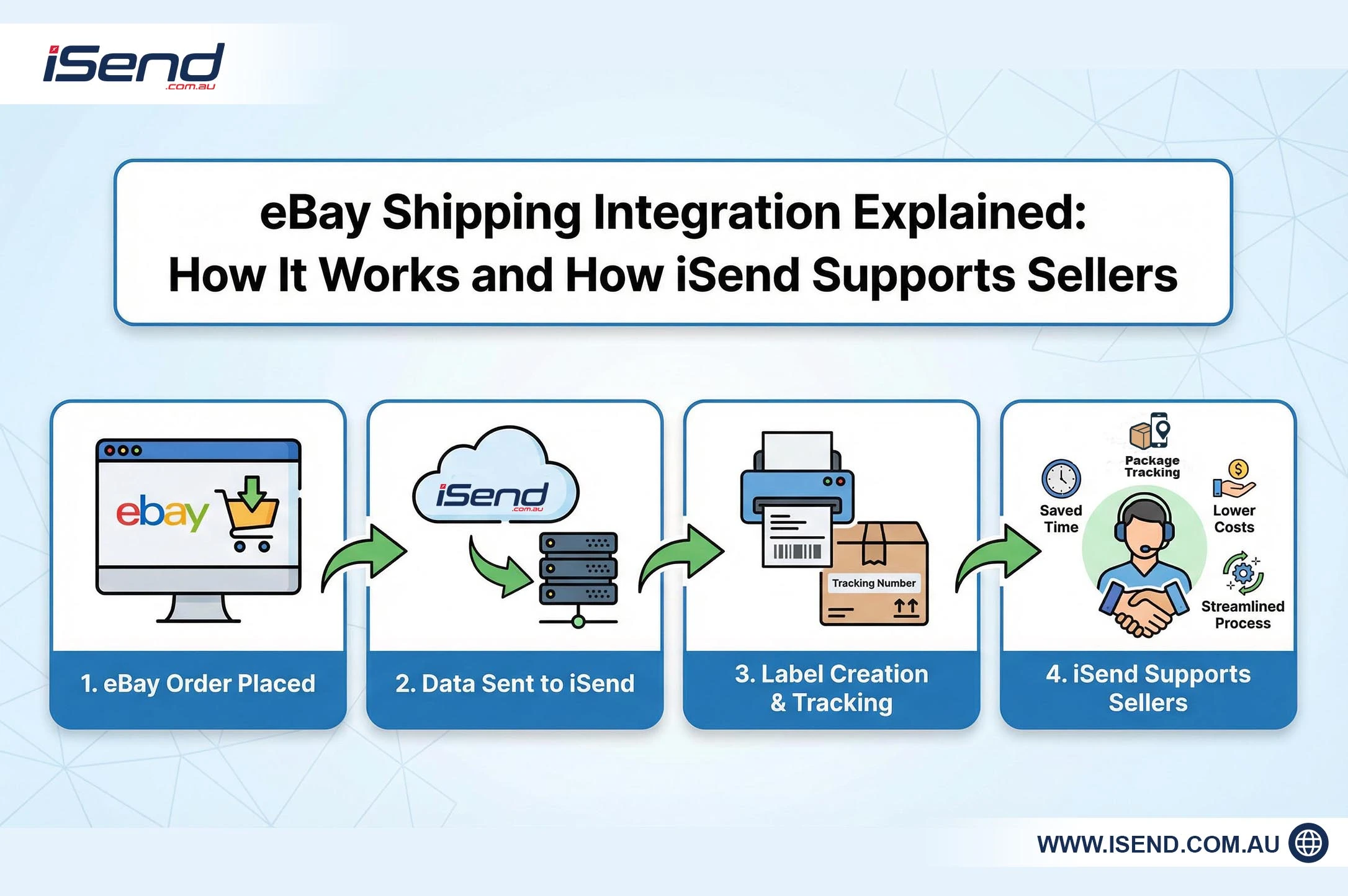
Upon the customer making an order, the shipping platform picks up the order information immediately. Your shipping software processes the eBay orders, creates the shipping label, and sends the tracking back to eBay.
Step-by-Step Guide to eBay Shipping Integration
Step 1: Create Your iSend Account: Head to isend.com.au and sign up for a free account. Enter your business name, email, and contact details to get started.
Step 2: Connect Your eBay Store: Go to Ecommerce Stores in your iSend dashboard menu, select eBay, and click Connect. You’ll be redirected to eBay’s secure authorisation page to grant iSend access — it takes less than a minute.
Step 3: Auto-Import Your Orders: Once connected, all your active eBay orders sync into iSend automatically — no manual entry, no spreadsheets.
Step 4: Compare Rates and Select a Courier: iSend displays rates from Australia’s top carriers side by side. Pick the fastest or most cost-effective option for each order.
Step 5: Print Your Shipping Labels: Generate and print labels individually or in bulk with a single click — compatible with both A4 and thermal printers.
Step 6: Dispatch the Parcel: Drop off at your nearest carrier outlet or schedule a pickup directly through iSend.
Step 7: Tracking Updates Automatically: The moment your parcel is dispatched, iSend pushes the tracking number back to eBay — your buyer is notified instantly without any manual input from you.
Pros and Cons of Using eBay Shipping Software
There are some operational benefits achieved by using eBay shipping solutions, and it is also worth knowing the possible limitations.
Advantages
- Faster order processing
- Reduced manual work
- Improved shipping accuracy
- Automated tracking updates
- Improved carrier rate quotations.
Limitations
- Some platforms require subscription fees.
- The initial steps of integration might be time-consuming.
- High-level automation may need configuration.
Although such restrictions exist, it is clear that most sellers realise that the advantages of the best eBay shipping software easily outweigh the disadvantages.
Now, we will discuss the various integrations that can be used.
Types of eBay Shipping Integrations Available
The eBay shipping process can be handled in a number of ways, depending on the size of your business and the fulfilment strategy. All of the integrations have varying degrees of automation and control.
Native eBay Shipping Tools
eBay offers its own eBay shipping resources, which enable sellers to print labels and handle shipping in the marketplace. The tools are straightforward and are appropriate where the seller has small volumes of orders.
Nevertheless, in-house solutions might not provide the same level of automation as dedicated shipping solutions.
Third-Party Shipping Platforms
eBay shipping software is an application that links your store to several carriers and automates. These are sites that provide advanced eBay seller tools like bulky label printing, price perusing and computerised rules.
They are especially useful in the development of sellers with large quantities of orders.
Shipping Software vs Fulfilment Services
Shipping software allows you to organise the shipping, pack, and dispatch the orders by yourself. On the other hand, fulfilment services store inventory and handle the shipping process in their entirety.
Most companies are combining both methods to develop a scalable workflow for eBay shipping.
Next, we will take a look at how iSend fits into such an ecosystem.
iSend’s Role: How iSend Handles eBay Shipping Integration
iSend eBay integration makes fulfilment simpler as it links your eBay store to the iSend shipping platform. When it is integrated, your orders are automatically synchronised to the system, and you do not need to manually enter your orders.
eBay shipping software, such as iSend, enables you to use numerous carriers, create labels fast, and track shipments on a single dashboard. This is a centralised design that enhances visibility throughout your entire eBay shipping process.
iSend is also compatible with shipping automation on eBay, which enables you to use the automation rules, compare the shipping rates, and work with bulk orders. In the case of increasing sellers, this simplifies fulfilment and makes it quicker and more precise.
However, regardless of these advantages, there are several misunderstandings related to integrations in shipping.
Common Myths About eBay Shipping Integrations
Many sellers hesitate to adopt eBay shipping integration because of common misconceptions about complexity and cost. The knowledge of the truth behind these myths can help you make better choices.
The most prevalent myth is that eBay shipping software could only be of utility to big sellers. As a matter of fact, automation is useful even in small businesses as it saves time and helps to lessen manual labour.
The other myth is that integrations are not easy to establish. The majority of new eBay shipping partners have guided integration processes that will make your store linked in just a few minutes.
Having demystified those myths, now is the time to provide answers to some of the commonly asked questions.
Frequently Asked Questions About eBay Shipping Software
Does eBay have integrated shipping?
Yes, eBay offers integrated eBay shipping services that enable sellers to label and ship items right out of their seller dashboard. Such software helps to track various carriers and enables you to post tracking numbers.
How much does eBay take from a $100 sale?
The final value fee generally applies to eBay, and this fee depends on the product category. This commission varies between 10 and 15 per cent of the selling price in most of the categories.
This means out of a $100 sale, eBay can get around $10 to $15 in fees, not to mention other extras like promoted listings or payment fees.
How does eBay shipping work in Australia?
The Australian eBay shipping can be carried out by domestic courier services like DTDC Australia and other courier services. Shipping labels can be created by sellers via eBay or eBay third-party shipping providers.
The recommendation is to use the best eBay shipping software to offer Australian sellers a comparison of carrier rates and automate their shipping workflow.
Why won’t eBay let me combine shipping?
Combined shipping relies on the settings that are made by the seller on the listing. eBay can block the option in case items are posted with fixed shipping regulations that prohibit aggregated shipments.
Final Thoughts
Efficiency in dealing with eBay shipping is also vital in ensuring a good buyer experience and ensuring that the operations of fulfilment are controlled. Manual shipping can only bring down your workflow as the order volumes increase.
That is why a large number of sellers embrace eBay shipping integration and automation tools. With eBay shipping integration platforms, it is possible to automate the order processing system, minimise mistakes and enhance delivery visibility.
There are solutions such as iSend eBay integration, whereby you can centralise shipping operations and also have powerful eBay shipping automation features. With the right eBay shipping tools, you can build a scalable fulfilment system for your store’s long-term growth.
Recent Posts
-

-

What Is Ecommerce Fulfilment & How It Works
March 3, 2026 -

A Complete Guide to COGS Computation
February 12, 2026 -

Custom Duty India: Rules You Must Know Before Shipping to India
February 12, 2026 -

Import Tax Australia: A Complete Guide to Duties, GST & Fees (2026)
February 4, 2026